
Bring orders in. Send delivery events back.
Use ready-made push endpoints, files, Zapier, Google Sheets, or the REST API to create delivery tasks without re-keying orders. Use webhooks to send delivery events back to your own systems.
Pick your integration
Open one to see what it does and how to connect it.
 E-commerce
Shopify
Connect your store in Settings, import orders, and optionally mark Shopify fulfilled on delivery.
View integration E-commerce
WooCommerce
Connect REST keys in Settings, import orders, and optionally mark Woo completed on delivery.
View integration Automation
Zapier
Wire up order and status updates with no-code workflows.
View integration Spreadsheets
Google Sheets
Turn sheet rows into delivery tasks for your ops team.
View integration Custom systems
API
Connect your OMS, ERP, and internal apps through our developer API.
View integration Real-time events
Webhooks
Get delivery lifecycle events in your own systems.
View integration File-based
CSV Import
Load batches of deliveries from CSV or Excel files.
View integration MCP connector
AI assistants
Ask your AI assistant about today’s routes, late stops, failed deliveries and driver progress. Read-only, signed in with your own account.
- Claude
- ChatGPT
- Cursor
- VS Code
Orders in, routes out
Connect once. New orders show up as delivery tasks for planners and dispatch. No retyping between your store and the warehouse.
Step 1
Connect your order source
Shopify, WooCommerce, Zapier, Google Sheets, CSV, or the API.
Step 2
Plan and dispatch
Incoming orders become delivery tasks your team can plan and dispatch.
Step 3
Sync events back
Webhooks and tracking links keep your systems and customers in the loop.
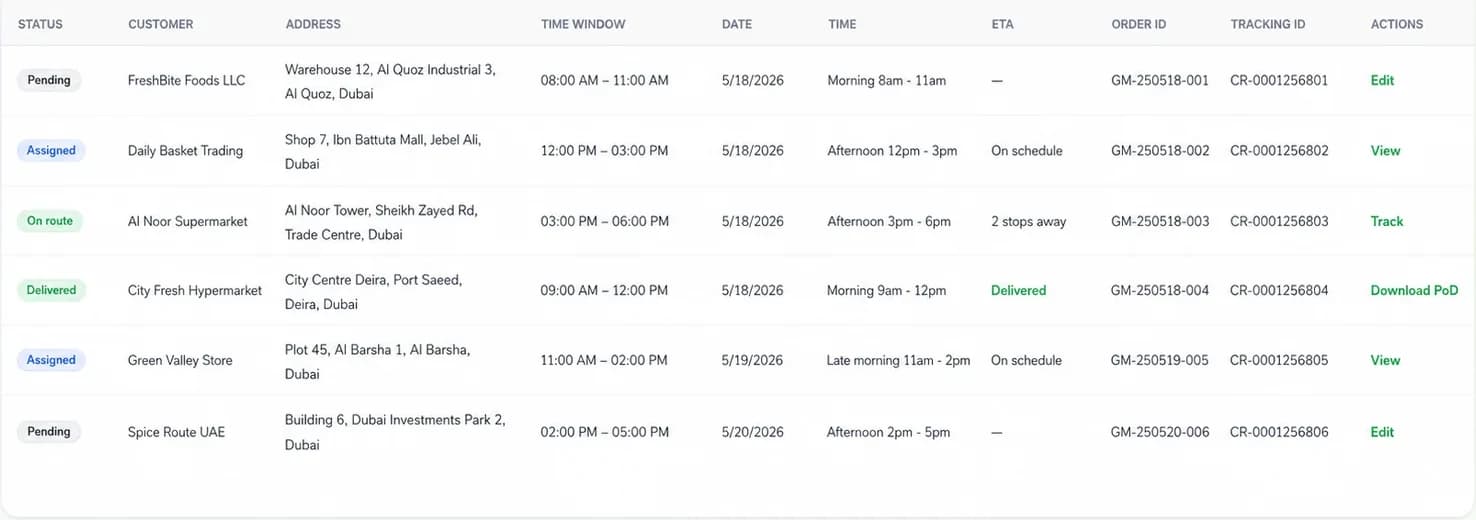
Imported orders, with status, delivery window, ETA, and tracking ID.
Don’t see your app?
Different OMS, ERP, CRM, warehouse system, or internal tool? We can still connect it, usually through the API or webhooks.